Displaying products with dynamic content in the code editor
The code editor lets you pull live product data into your contents using Razor syntax. Depending on what you want to show – recommendations, cart contents, recently viewed products, price drops, or order details – each method returns a list of products and the store currency.
Where can I find dynamic content in the code editor?#
You’ll find a list of dynamic content that displays products in content created in the code editor on the toolbar.
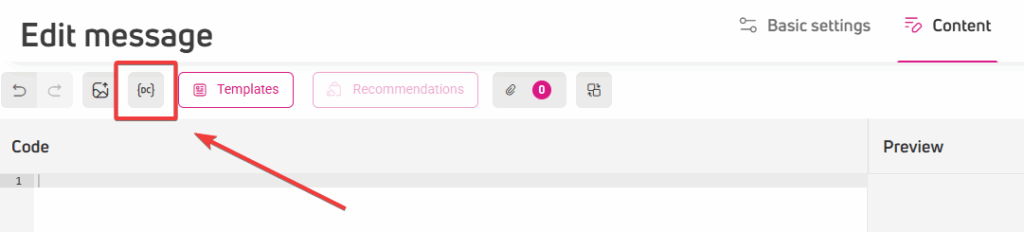
Click the (DC) icon to access the list of dynamic content. You’ll find the methods in the Content section.
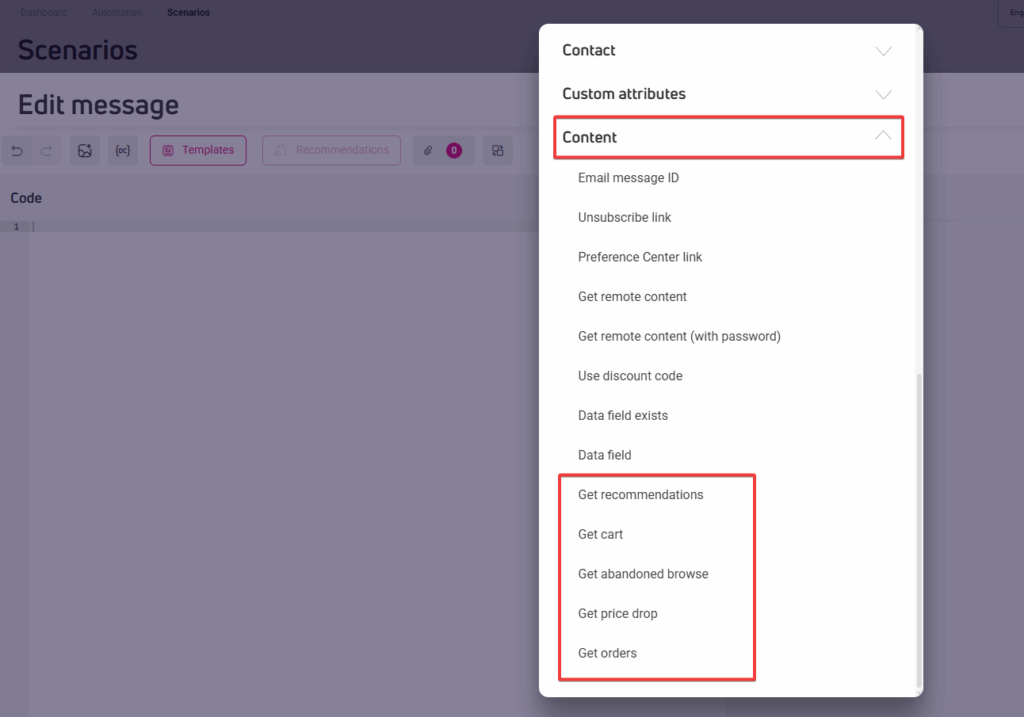
Click the method you want to use, and it will appear in the editor window.
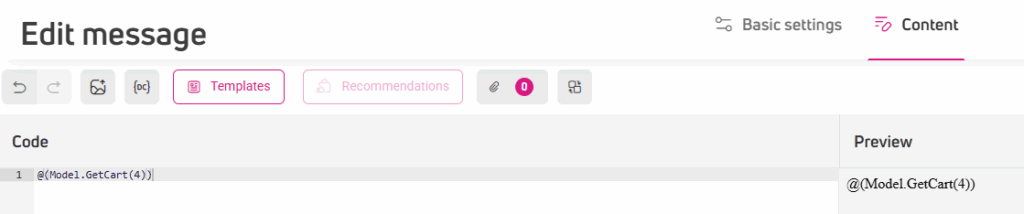
Product data won’t render in the editor preview. To see real product data, use the Preview option or test the content on your actual website.
Method overview
| Method | Description | Returns | Available in |
| GetRecommendations | Products recommended for the current customer based on their behavior. | Products + Currency | Email Newsletter, Scenario Email, Pop-up, Banner |
| GetCart | Products the current customer has added to their cart. | Products + Currency | Scenario Email (with start point validation), Pop-up, Banner |
| GetAbandonedBrowseProducts | Products the customer browsed but didn’t buy. | Products + Currency | Scenario Email (with start point validation) |
| GetPriceDropProducts | Products that got cheaper since the customer’s last visit. | Products + Currency | Scenario Email (with start point validation) |
| GetOrders | Products and details from a specific customer order. | Products + order details + currency | Email Newsletter, Scenario Email, Pop-up, Banner |
Get recommendations
Returns a list of recommended products for the current customer, along with the store currency.
Method signature
var recommendations = Model.GetRecommendations(int count = 4);Parameters
| Parameter | Type | Default | Description |
| count | int | 4 | Number of products to retrieve. |
Return value
{
  "Products": [
    {
      "Id": "SKU-123",
      "Name": "Nike Air Zoom",
      "Url": "https://shop.example.com/p/nike-air-zoom",
      "ImageUrl": "https://shop.example.com/media/nike-air-zoom.jpg",
      "Category": "Shoes",
      "PriceString": "349.99",
      "CurrentPriceString": "299.99",
      "OmnibusPriceString": "329.99",
      "AdditionalInfo": "",
      "CustomProductAttributes": [
        {
          "Id": 101,
          "Name": "Brand",
          "Value": "Nike",
          "ValueString": "Nike"
        }
      ]
    }
  ],
  "Currency": {
    "ISO": "PLN",
    "Sign": "zł"
  }
}| Field | Type | Description |
| Id | string | Unique product identifier. |
| Name | string | Product name. |
| Url | string | URL of the product page. |
| ImageUrl | string | URL of the product image. |
| Category | string | Product category. |
| PriceString | string | Regular price, formatted as string. |
| CurrentPriceString | string | Sale price, formatted as string. Empty if no sale is active. |
| OmnibusPriceString | string | Lowest price in the last 30 days (EU Omnibus Directive). |
| AdditionalInfo | string | Optional additional information. |
| CustomProductAttributes | list | Custom attributes defined for the product (e.g. Brand, Color). |
Usage examples
Displaying the first recommended product
@{
    var recommendations = Model.GetRecommendations(4);
    var product = recommendations.Products?.FirstOrDefault();
}
@if (product != null)
{
    <a href="@product.Url">
        <img src="@product.ImageUrl" alt="@product.Name" />
    </a>
    <div>@product.Name</div>
    <div>
        @(string.IsNullOrWhiteSpace(product.CurrentPriceString)
            ? product.PriceString
            : product.CurrentPriceString)
        @recommendations.Currency.Sign
    </div>
}
Looping through all recommended products
@{
    var recommendations = Model.GetRecommendations(4);
}
@foreach (var product in recommendations.Products)
{
    if (product != null)
    {
        <a href="@product.Url">
            <img src="@product.ImageUrl" alt="@product.Name" />
        </a>
        <div>@product.Name</div>
        <div>
            @(string.IsNullOrWhiteSpace(product.CurrentPriceString)
                ? product.PriceString
                : product.CurrentPriceString)
            @recommendations.Currency.Sign
        </div>
    }
}
Reading a custom product attribute
@{
    var brand = product?.CustomProductAttributes
        ?.FirstOrDefault(x => x.Name == "Brand")?.ValueString;
}
Notes
- Always use null-conditional operators (?.) when accessing product properties.
- GetRecommendations retrieves 4 products by default. Adjust the count parameter to match your banner layout.
- Use CurrentPriceString to display the sale price, and fall back to PriceString if it is empty.
- OmnibusPriceString contains the lowest price from the last 30 days and should be displayed alongside a discounted price to comply with EU Omnibus Directive requirements.
Get cart
Returns products currently in the current customer’s cart, along with the store currency.
Method signature
var cart = Model.GetCart(int count = 100);Parameters
| Parameter | Type | Default | Description |
| count | int | 100 | Maximum number of cart products to retrieve. |
Return value
{
  "Products": [
    {
      "Id": "SKU-123",
      "Name": "Nike Air Zoom",
      "Url": "https://shop.example.com/p/nike-air-zoom",
      "ImageUrl": "https://shop.example.com/media/nike-air-zoom.jpg",
      "Category": "Shoes",
      "PriceString": "349.99",
      "CurrentPriceString": "299.99",
      "OmnibusPriceString": "329.99",
      "AdditionalInfo": "",
      "Quantity": 2,
      "CustomProductAttributes": [
        {
          "Id": 101,
          "Name": "Brand",
          "Value": "Nike",
          "ValueString": "Nike"
        }
      ]
    }
  ],
  "Currency": {
    "ISO": "PLN",
    "Sign": "zł"
  }
}| Field | Type | Description |
| Id | string | Unique product identifier. |
| Name | string | Product name. |
| Url | string | URL of the product page. |
| ImageUrl | string | URL of the product image. |
| Category | string | Product category. |
| PriceString | string | Regular price, formatted as string. |
| CurrentPriceString | string | Sale price, formatted as string. Empty if no sale is active. |
| OmnibusPriceString | string | Lowest price in the last 30 days (EU Omnibus Directive). |
| Quantity | int | Number of units of this product in the cart. |
| AdditionalInfo | string | Optional additional information. |
| CustomProductAttributes | list | Custom attributes defined for the product (e.g. Brand, Color). |
Usage examples
Displaying the first cart product
@{
    var cart = Model.GetCart(4);
    var product = cart.Products?.FirstOrDefault();
}
@if (product != null)
{
    <a href="@product.Url">
        <img src="@product.ImageUrl" alt="@product.Name" />
    </a>
    <div>@product.Name</div>
    <div>Quantity: @product.Quantity</div>
    <div>
        @(string.IsNullOrWhiteSpace(product.CurrentPriceString)
            ? product.PriceString
            : product.CurrentPriceString)
        @cart.Currency.Sign
    </div>
}
Looping through all cart products
@{
    var cart = Model.GetCart(4);
}
@foreach (var product in cart.Products)
{
    if (product != null)
    {
        <a href="@product.Url">
            <img src="@product.ImageUrl" alt="@product.Name" />
        </a>
        <div>@product.Name</div>
        <div>Quantity: @product.Quantity</div>
        <div>
            @(string.IsNullOrWhiteSpace(product.CurrentPriceString)
                ? product.PriceString
                : product.CurrentPriceString)
            @cart.Currency.Sign
        </div>
    }
}
Notes
- If no cart is found for the customer, the method may return a cart-not-found error instead of an empty list. Make sure to handle this case in your template.
- The Quantity field is unique to this method and is not available in other product methods.
Get abandoned browse products
Returns products that the customer viewed but did not purchase.
Method signature
var abandonedBrowse = Model.GetAbandonedBrowseProducts(int count = 100);Parameters
| Parameter | Type | Default | Description |
| count | int | 100 | Maximum number of products to retrieve. |
Return value
{
  "Products": [
    {
      "Id": "SKU-123",
      "Name": "Nike Air Zoom",
      "Url": "https://shop.example.com/p/nike-air-zoom",
      "ImageUrl": "https://shop.example.com/media/nike-air-zoom.jpg",
      "Category": "Shoes",
      "PriceString": "349.99",
      "CurrentPriceString": "299.99",
      "OmnibusPriceString": "329.99",
      "AdditionalInfo": "",
      "CustomProductAttributes": [
        {
          "Id": 101,
          "Name": "Brand",
          "Value": "Nike",
          "ValueString": "Nike"
        }
      ]
    }
  ],
  "Currency": {
    "ISO": "PLN",
    "Sign": "zł"
  }
}| Field | Type | Description |
| Id | string | Unique product identifier. |
| Name | string | Product name. |
| Url | string | URL of the product page. |
| ImageUrl | string | URL of the product image. |
| Category | string | Product category. |
| PriceString | string | Regular price, formatted as string. |
| CurrentPriceString | string | Sale price, formatted as string. Empty if no sale is active. |
| OmnibusPriceString | string | Lowest price in the last 30 days (EU Omnibus Directive). |
| AdditionalInfo | string | Optional additional information. |
| CustomProductAttributes | list | Custom attributes defined for the product (e.g. Brand, Color). |
Usage examples
Displaying the first abandoned browse product
@{
    var abandonedBrowse = Model.GetAbandonedBrowseProducts(4);
    var product = abandonedBrowse.Products?.FirstOrDefault();
}
@if (product != null)
{
    <a href="@product.Url">
        <img src="@product.ImageUrl" alt="@product.Name" />
    </a>
    <div>@product.Name</div>
    <div>
        @(string.IsNullOrWhiteSpace(product.CurrentPriceString)
            ? product.PriceString
            : product.CurrentPriceString)
        @abandonedBrowse.Currency.Sign
    </div>
}
Looping through all abandoned browse products
@{
    var abandonedBrowse = Model.GetAbandonedBrowseProducts(4);
}
@foreach (var product in abandonedBrowse.Products)
{
    if (product != null)
    {
        <a href="@product.Url">
            <img src="@product.ImageUrl" alt="@product.Name" />
        </a>
        <div>@product.Name</div>
        <div>
            @(string.IsNullOrWhiteSpace(product.CurrentPriceString)
                ? product.PriceString
                : product.CurrentPriceString)
            @abandonedBrowse.Currency.Sign
        </div>
    }
}
Reading a custom product attribute
@{
    var color = product?.CustomProductAttributes
        ?.FirstOrDefault(x => x.Name == "Color")?.ValueString;
}
Notes
- If the number of products found is lower than count, the Products list may contain null entries. Always check for null before accessing product properties.
Get price drop products
Returns products whose price has dropped since the customer’s last visit.
Method signature
var priceDropProducts = Model.GetPriceDropProducts(int count = 100);Parameters
| Parameter | Type | Default | Description |
| count | int | 100 | Maximum number of products to retrieve. |
Return value
{
  "Products": [
    {
      "Id": "SKU-123",
      "Name": "Nike Air Zoom",
      "Url": "https://shop.example.com/p/nike-air-zoom",
      "ImageUrl": "https://shop.example.com/media/nike-air-zoom.jpg",
      "Category": "Shoes",
      "PriceString": "299.99",
      "CurrentPriceString": "",
      "OmnibusPriceString": "",
      "PriceLastSeenByCustomer": 349.99,
      "PriceLastSeenByCustomerString": "349.99",
      "AdditionalInfo": "",
      "CustomProductAttributes": [
        {
          "Id": 101,
          "Name": "Brand",
          "Value": "Nike",
          "ValueString": "Nike"
        }
      ]
    }
  ],
  "Currency": {
    "ISO": "PLN",
    "Sign": "zł"
  }
}| Field | Type | Description |
| Id | string | Unique product identifier. |
| Name | string | Product name. |
| Url | string | URL of the product page. |
| ImageUrl | string | URL of the product image. |
| Category | string | Product category. |
| PriceString | string | Current product price, formatted as string. |
| CurrentPriceString | string | Sale price, formatted as string. Empty if no sale is active. |
| OmnibusPriceString | string | Lowest price in the last 30 days (EU Omnibus Directive). |
| PriceLastSeenByCustomer | decimal | The price the customer saw on their last visit. |
| PriceLastSeenByCustomerString | string | PriceLastSeenByCustomer formatted as string. |
| AdditionalInfo | string | Optional additional information. |
| CustomProductAttributes | list | Custom attributes defined for the product (e.g. Brand, Color). |
Usage examples
Displaying the first price drop product
@{
    var priceDropProducts = Model.GetPriceDropProducts(4);
    var product = priceDropProducts.Products?.FirstOrDefault();
}
@if (product != null)
{
    <a href="@product.Url">
        <img src="@product.ImageUrl" alt="@product.Name" />
    </a>
    <div>@product.Name</div>
    <div>Now: @product.PriceString @priceDropProducts.Currency.Sign</div>
    <div>Was: @product.PriceLastSeenByCustomerString @priceDropProducts.Currency.Sign</div>
}
Looping through all price drop products
@{
    var priceDropProducts = Model.GetPriceDropProducts(4);
}
@foreach (var product in priceDropProducts.Products)
{
    if (product != null)
    {
        <a href="@product.Url">
            <img src="@product.ImageUrl" alt="@product.Name" />
        </a>
        <div>@product.Name</div>
        <div>Now: @product.PriceString @priceDropProducts.Currency.Sign</div>
        <div>Was: @product.PriceLastSeenByCustomerString @priceDropProducts.Currency.Sign</div>
    }
}
Notes
- If the number of products found is lower than count, the Products list may contain null entries. Always check for null before accessing product properties.
- PriceLastSeenByCustomerString holds the price the customer saw on their previous visit. Use it alongside PriceString to clearly communicate the price reduction.
Get orders
Returns a list of orders for the current customer, including the products in each order, order-level details, and both the original and converted currency. The method is available in email newsletters, Scenario emails, Pop-ups, and Banners.
When called without parameters, it returns all orders for the customer.
Method signature
var orders = Model.GetOrders(
    string? orderId = null,
    int? websiteId = null,
    string[]? status = null,
    string sort = "OrderDate DESC",
    string? dateFrom = null,
    string? dateTo = null,
    int? limitReturnedOrders = null
);
Parameters
If no parameters are provided, the method returns all orders for the current customer.
| Parameter | Type | Default value | Required | Description |
| orderId | string | null | no | ID of the order to retrieve. If omitted, all customer orders are returned. |
| websiteId | int | null | no | ID of the website the order is associated with. If omitted and multiple orders share the same ID, the most recent one is returned (based on order date). |
| status | string[] | null | no | Filters orders by status. Pass as new[] { “Completed”, “Paid” }. If omitted, orders of all statuses are returned. |
| sort | string | null | no | Sort order, expressed as a SQL fragment. You can sort by one or more allowed columns (see Allowed sort columns below). |
| dateFrom | string | null | no | Start of the date range. Format: “YYYY-MM-DD”. If omitted, no lower date limit is applied. |
| dateTo | string | null | no | End of the date range. Format: “YYYY-MM-DD”. If omitted, no upper date limit is applied. |
| limitReturnedOrders | Int | null | no | Maximum number of orders to return. If omitted, all matching orders are returned. |
Allowed sort columns
You can sort by the following columns only. Any other value will be rejected to prevent SQL injection.
- OrderDate
- Value
- ConvertedValue
- OrderId
- WebsiteId
To sort by multiple columns, separate them with a comma: “OrderDate DESC, Value ASC”.
Return value
[
  {
    "Products": [
      {
        "Id": "product123",
        "Name": "Product Name",
        "Url": "https://shop.com/product/product123",
        "ImageUrl": "https://shop.com/images/product123.jpg",
        "Category": "Electronics",
        "Price": 79.99,
        "PriceString": "79.99",
        "ConvertedPrice": 72.53,
        "Quantity": 2,
        "Returned": false,
        "OrderProductId": 123,
        "CustomProductAttributes": [
          { "Id": 1, "Name": "name1", "Value": "blue", "ValueString": "blue" },
          { "Id": 2, "Name": "name2", "Value": 15.99, "ValueString": "15.99" }
        ]
      }
    ],
    "OrderDate": "2025-04-14T23:06:00",
    "Status": "Paid",
    "TotalValue": 159.98,
    "ConvertedTotalValue": 134.67,
    "OriginalCurrency": { "ISO": "USD", "Sign": "$" },
    "ConvertedCurrency": { "ISO": "EUR", "Sign": "€" },
    "CustomOrderAttributes": [
      { "Id": 1, "Name": "custom order attribute name", "Value": 123, "ValueString": "123" }
    ]
  }
]| Field | Type | Description |
| Id | string | Unique product identifier. |
| Name | string | Product name. |
| Url | string | URL of the product page. |
| ImageUrl | string | URL of the product image. |
| Category | string | Product category. |
| Price | decimal | Regular price as a decimal value. |
| PriceString | string | Regular price, formatted as string. |
| ConvertedPrice | decimal | Price converted to the store’s reporting currency. |
| Quantity | int | Number of units of this product in the order. |
| Returned | bool | Indicates whether the product was returned. |
| OrderProductId | int | Unique identifier of the product line within the order. |
| CustomProductAttributes | list | Custom attributes defined for the product (e.g. Brand, Color). |
| OrderDate | datetime | Date and time the order was placed. |
| Status | string | Current order status (e.g. “Paid”, “Completed”). |
| TotalValue | decimal | Total order value in the original currency. |
| ConvertedTotalValue | decimal | Total order value converted to the reporting currency. |
| OriginalCurrency | object | Currency used when the order was placed (ISO and Sign). |
| ConvertedCurrency | object | Currency used for converted values (ISO and Sign). |
| CustomOrderAttributes | list | Custom attributes defined for the order. |
Usage examples
Get all orders for the current customer
var orders = Model.GetOrders();Get a specific order by ID
var orders = Model.GetOrders("ORDER-12345");Filter by status
var orders = Model.GetOrders(null, null, new[] { "Completed", "Paid" });Sort by value, ascending
var orders = Model.GetOrders(null, null, null, "Value ASC");Filter by date range
var orders = Model.GetOrders(null, null, null, "OrderDate DESC", "2023-01-01", "2023-12-31");Get the last N orders (e.g. the 5 most recent)
var orders = Model.GetOrders(null, null, null, "OrderDate DESC", null, null, 5);Use named parameters when you only need specific ones
var orders = Model.GetOrders(websiteId: 123, limitReturnedOrders: 2);Use in a post-purchase scenario (passing the order ID from the scenario start point)
When your scenario uses the Order start point, the order ID is available as Model.OrderId. Pass it directly to retrieve exactly the order that triggered the scenario:
@{
    var orders = Model.GetOrders(Model.OrderId);
}
Model.OrderId is only available in scenario emails that use the Order start point. In newsletters, banners, and pop-ups, pass the order ID explicitly or use other parameters to filter orders.
Displaying products from a specific order
@{
    var orders = Model.GetOrders("12343XYZ", websiteId: 2, status: new[] { "Paid", "Completed" });
    var firstOrder = orders?.FirstOrDefault();
    var product = firstOrder?.Products?.FirstOrDefault();
}

@if (product != null)
{
    <a href="@product.Url">
        <img src="@product.ImageUrl" alt="@product.Name" />
    </a>
    <div>@product.Name</div>
    <div>Quantity: @product.Quantity</div>
    <div>@product.PriceString @firstOrder.OriginalCurrency.Sign</div>
}
Looping through all products in an order
@{
    var orders = Model.GetOrders("12343XYZ", websiteId: 2, status: new[] { "Paid", "Completed" });
    var firstOrder = orders?.FirstOrDefault();
}

@if (firstOrder != null)
{
    foreach (var product in firstOrder.Products)
    {
        if (product != null)
        {
            <a href="@product.Url">
                <img src="@product.ImageUrl" alt="@product.Name" />
            </a>
            <div>@product.Name</div>
            <div>Quantity: @product.Quantity</div>
            <div>@product.PriceString @firstOrder.OriginalCurrency.Sign</div>
        }
    }
}
Reading a custom order attribute
@{
    var customAttr = firstOrder?.CustomOrderAttributes
        ?.FirstOrDefault(x => x.Name == "custom order attribute name")?.ValueString;
}
Reading a custom product attribute
@{
    var brand = product?.CustomProductAttributes
        ?.FirstOrDefault(x => x.Name == "Brand")?.ValueString;
}
Notes
- GetOrders always returns a list, even when you retrieve a single order. Use FirstOrDefault() to work with a single order, or loop through the full list.
- Always use null-conditional operators (?.) when accessing order and product properties to prevent errors.
- Use PriceString with OriginalCurrency.Sign to display prices in the order’s original currency. Use ConvertedPrice with ConvertedCurrency.Sign if you need to display prices in a converted currency.
- If no orders match the given parameters, the method may return an empty list. Make sure to handle this case in your template.
- In a post-purchase scenario, use Model.OrderId to retrieve the specific order that triggered the scenario. Be aware that if the scenario runs over several days, the customer may have placed a new order in the meantime. In that case, calling GetOrders() without a specific ID would return the newer order, not the one that started the scenario.
- The status parameter uses the array syntax new[ ] { “Completed”, “Paid” } (RazorLight engine requirement).
- Sorting accepts SQL-style fragments and is limited to the allowed columns listed above.