Attribution – how we assign click sources to orders
In ECDP, attribution means assigning an order to the last-click source that led a customer to your site before their purchase, all within a set time frame. This source can be an email, SMS, web push notification, or a product recommendation
How we attribute orders in ECDP#
ECDP uses the last-click model. According to this rule, 100% of the order value is assigned to the last channel that directed the customer to your website.
For example:
A customer first clicks a search engine ad, then visits from a social media platform, and finally clicks a link in an email and buys a product. The order will be attributed to the email channel because it was the last source before the purchase.
The last-click model helps you understand what prompted customers to make their final decision and complete a purchase.
Every order is attributed to a single channel
A customer can interact with several channels at once, and their attribution windows can be open at the same time. The order will still be attributed to one channel only: the one where the click occurred last. Order value is never split between channels and never counted twice.
For example:
A customer clicks a link in an email on Monday and clicks a web push notification on Tuesday. On Wednesday they place an order. Both clicks fall within their attribution windows, but the order goes to the web push channel because that click was the latter one.
Order status in attribution#
All orders are included in attribution, regardless of their status.
However, order status is important for reports – it determines whether a specific order is counted as revenue. Attribution itself doesn’t affect the final revenue total; it simply shows which marketing activities helped lead to an order being placed.
Attribution time window#
The attribution window is the period during which we can link a click to an order. If you set the window for 30 days, an order will be linked to the last click only if it happened within 30 days before the purchase.
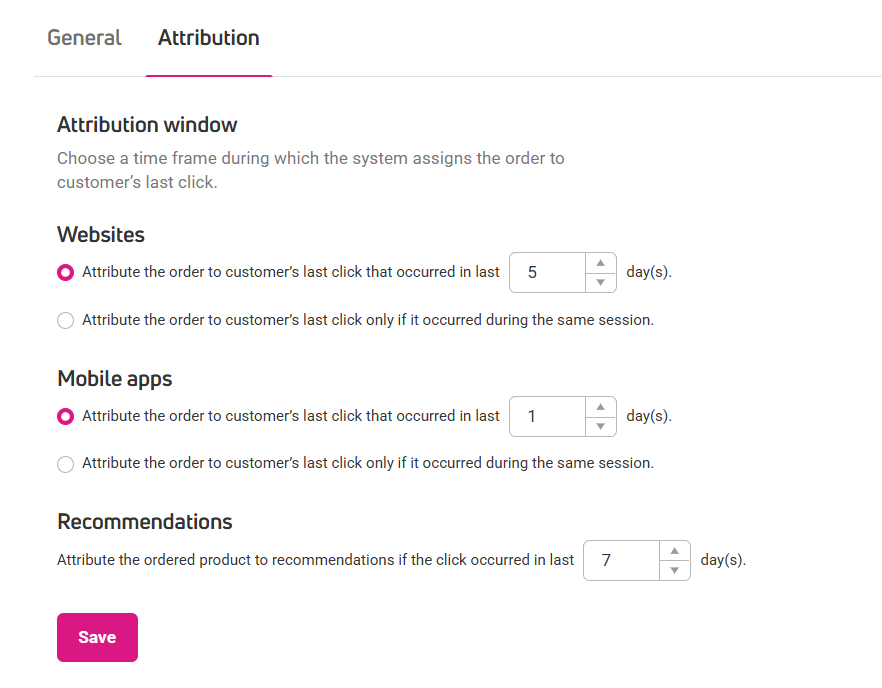
You can set the attribution time window in Settings > General > Attribution. You will find three independent settings there:
- Websites – covers the email, SMS and web push channels. 5 days by default.
- Mobile apps – covers the mobile push channel. 1 day by default.
- Recommendations – covers product recommendations. 7 days by default.
Each of these settings works separately and is configured individually for each unit. Changing one of them does not affect the others.
Two ways to count the attribution window
In the Websites and Mobile apps settings, you choose one of two options:
- Attribute the order to customer’s last click that occurred in last X day(s).
- Attribute the order to customer’s last click only if it occurred during the same session.
These are alternatives, not two conditions at once. If you choose the second option, only a purchase made in the same session as the click counts, no matter how much time has passed.
In both settings, the minimum attribution window is 1 day. A value outside the allowed range blocks saving and shows an error message next to the field.
How the recommendations setting works
The Recommendations setting only has a field for the number of days, with no same-session option.
It also differs in what it attributes. A recommendation is credited with the ordered product, not with the whole order.
Changing the attribution window is not retroactive
Changing the attribution window applies going forward only. Every click is evaluated against the value that was in effect at the moment of that click, so attribution is never recalculated retroactively.